WarpEngine Client
WarpEngine Client is the desktop app for a WarpEngine store: the catalog as a grid of cards, one click to install a title into your application menu, one to play it, one to remove it. Linux, macOS and Windows. The current release is 3.1.0, which knows WarpEngine 1.0.
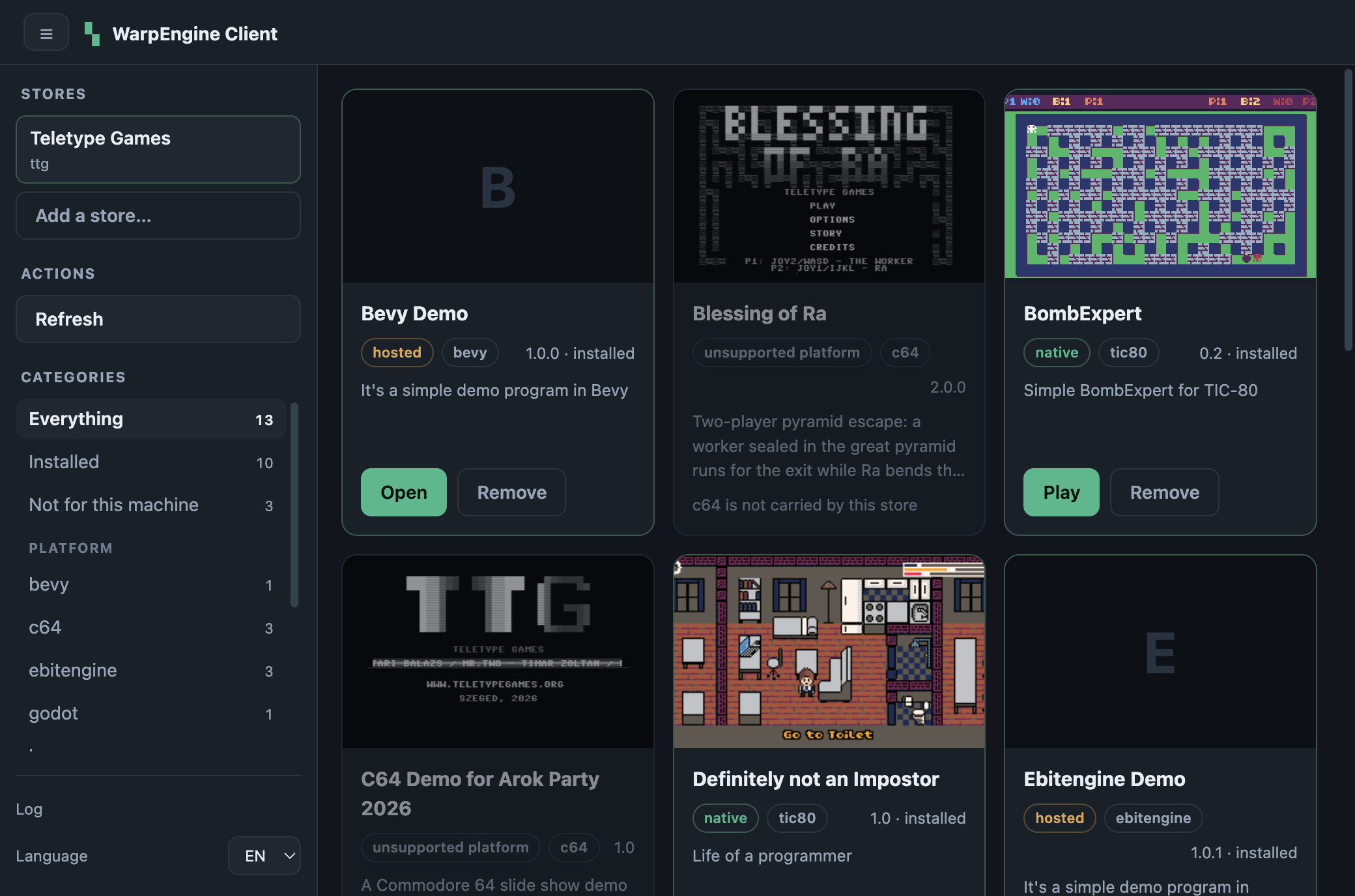
The store engine is part of the app. Reading the catalog, picking the release that fits the machine, unpacking it, writing the menu entry and remembering what went where all happen in process. There is no interpreter to find and no child process to parse: the app has no runtime dependencies at all, not even a zip library. What lands on disk has not changed, though: config.json and state.json keep the shape the shell store wrote, so a library installed by the CLI is picked up as it is.
Which store it installs is not baked in: the client asks a registry (GET /api/stores on the site), and a record there is a name and a catalog, nothing more. Behaviour is the client's own business, and the games folder is a slug of the catalog host, so two stores on one machine never touch each other's files.
What it needs
Nothing. No interpreter, no package manager, no admin rights: the app carries its own runtime and the store installs under your own user account. To develop it you need Node 22 or newer, and the toolchain installs with make setup.
Install
Take the package for your machine from the releases and open it. On first run, with no store on the machine, the window offers what the registry publishes, or takes a catalog address you type. That is the whole setup.
Opening it on macOS
The build is ad-hoc signed but not notarised, so macOS asks before running a copy that came from a browser:
xattr -dr com.apple.quarantine "/Applications/WarpEngine Client.app"
Open Anyway under System Settings ▸ Privacy & Security works too, after a blocked attempt. Only notarisation removes the step, and that needs a paid Apple Developer ID. Files the store downloads later are unaffected: the app fetches them over its own HTTP client, which does not set the quarantine flag.
v1.0.0 could not be opened at all — it reported "is damaged". The bundle was never signed; only its main executable had the linker's ad-hoc signature, so there was no resource seal and Gatekeeper refused instead of asking. scripts/after-pack.js now signs the bundle during the build, and the result verifies as valid on disk.
Signing in, and titles that cost money
Nothing in this client knows anything about a particular store. Price, whether an account is needed, where to buy, where to sign in — all of it comes from the catalog's server: WarpEngine 0.5 answers GET /api/service with what it offers and puts an access block on every entry. That is why one build serves any shop. The endpoints and shapes the client reads are the WECP — WarpEngine Catalog Protocol, written up on its own page.
Where the server offers no sign-in (every WarpEngine before 0.5, and any store that sells nothing) the window shows none. Where it does:
- the side menu grows an Account block: Sign in…, then Sign out;
- signing in shows a short code. The browser opens the store's page, the code is typed there, and approving it signs this device in. No password ever reaches the client — that is the point of the detour.
- the token lives in the OS keychain (Keychain, libsecret, DPAPI) via Electron's
safeStorage, one per store. With no keychain it is not stored at all rather than written in the clear; the cost is signing in again next run.
On a card, what a person may do is separate from what the machine can run:
| State | What the card offers |
|---|---|
| owned, or free | Install |
| not owned | the price, and Buy, which opens the store page in a browser |
| signed out, catalog gates it | Sign in to install — the catalog cannot say whose it is until it knows who is asking |
Buying happens in the browser: a checkout rebuilt here would be a second place to get card handling wrong. Refresh afterwards turns the card into an Install.
Two status filters come with this — Owned and To buy — because owning is not the same as having installed.
An unbought title is not dimmed. Dimming means the machine cannot run it; nothing is wrong with the machine when a title simply costs money.
A bearer token is never sent to a host that did not issue it. A gated download redirects to signed storage — often somebody else's server — and some object stores reject a request that carries both an Authorization header and a signature.
Which store it installs
On first run the client fetches the registry. One store and there is nothing to decide; several and the setup screen shows a picker.
[
  { "name": "Teletype Games", "catalogUrl": "https://teletypegames.org" },
  { "name": "Some Other Store", "catalogUrl": "https://games.example.org" }
]
A name and a catalog are the whole record. The client already knows host-to-asset mapping, install modes, platforms and behaviour. What it cannot know is identity, and identity is all a registry says. From a record it derives:
- the store id — a slug of the catalog host (
teletypegames.org→teletypegames), or of the display name if that fails. It names the store home and the games folder. Two records naming the same catalog are the same store and land in the same place, so reinstalling never orphans anything. - the games folder — that slug inside the OS's usual place for installed programs. It is also the only subtree this store ever deletes from.
- which titles are listed — released, archived and demo. A catalog that publishes a demo means it to be played.
A catalog does not have to be in the registry at all: any WarpEngine catalog address can be added from the settings. A bare host is enough (https is assumed), and the name is taken from it.
The registry address is the one site-specific thing left in the client, decided in three places, most specific first: a runtime STORES_API, the address the package was built with, then ours.
STORES_API=http://127.0.0.1:8731/stores npm start            # trying something out
make dist STORES_API=https://games.example.org/api/stores    # shipping it
The build variant is written into the packaged app's package.json (warpEngine.registryUrl), so a client built for someone else's catalog needs no source change and nothing set on the user's machine. Adding a store is a database row on the site, not a release of this app.
A branded build
A build can carry a brand: a name and a store. make dist BRAND_NAME="Teletype Games Store" BRAND_STORE=https://teletypegames.org BRAND_ID=teletype-store bakes them into the package; BRAND_NAME=… BRAND_STORE=… npm start tries one out. The name is the window title, the bar heading and the productName (Dock, /Applications, NSIS folder, .desktop entry); the store is installed on the first run without a registry or a picker, under the brand's name, into the same store home a generic client would use for that catalog. The brand is an alternative default, not a cage: every store on the machine is still listed and the settings still add and remove them. BRAND_ID names the appId and the package files so a branded and a generic client coexist; RELEASES_API points Check for updates at the branded build's own releases. The settings' General tab says Based on WarpEngine Client 3.1.0. The brand is data the build supplies — nothing in the source names a store.
Use
Everything that is not a title lives in the side menu; the menu button folds it away and the state survives restarts.
| Section | What it holds |
|---|---|
| Stores | every store on this machine, the open one marked. Clicking another switches the grid, the filters and the folders, and the client reopens there next time. Two stores from the same catalog in different folders show their folder instead of their id. Adding, renaming and removing stores happen in the settings. |
| Account | Sign in… / Sign out, only where the catalog offers a sign-in. |
| Filters | four axes that combine: the status of a title on this machine (Everything, Installed, Updates, Not installed, and where the catalog gates anything, Owned and To buy), the platform, the kind (native or hosted) and the category, when the catalog publishes one — WarpEngine 0.12 carries a category from the metadata file into the catalog, so the axis appears as soon as titles are tagged, and 0.13's vocabulary (GET /api/software/vocabulary) gives the chips their labels. Every count says how many titles the option would show given the other axes as they stand, and Clear appears while anything narrows the catalog. The axes are built from what the catalog contains: a platform with no titles is not listed, and a choice that disappears falls back to Everything. |
| Footer | the gear (settings), the version number, Log and Refresh. Log opens the store's own output, verbatim, plus the two folders everything lands in. Refresh re-reads the catalog. Titles install one at a time from their cards; there is no install-everything button. |
The catalog arrives a page at a time, and the grid draws as it comes. WarpEngine 0.13 pages GET /api/software; the client reads every page in turn and shows each as it lands, with the bar counting titles until the last page. What needs the whole — the Updates group, Upgrade all, the prune — waits for it, and the cache always holds the stitched whole, never a partial one. The grid is windowed: it draws 48 titles and 48 more each time you near the bottom, so a large catalog costs what is on screen. A filter or search starts from the top; a page landing does not move your scroll.
The bar holds a search box: what is typed narrows the grid to the titles whose title or name contains it, case and accents ignored, so love finds LÖVE. It is part of the filter — the counts on the chips allow for it, Clear empties it, and so does Escape. The bar's toggle switches between the grid and a list; the list draws with the card's art, version and menu.
Settings
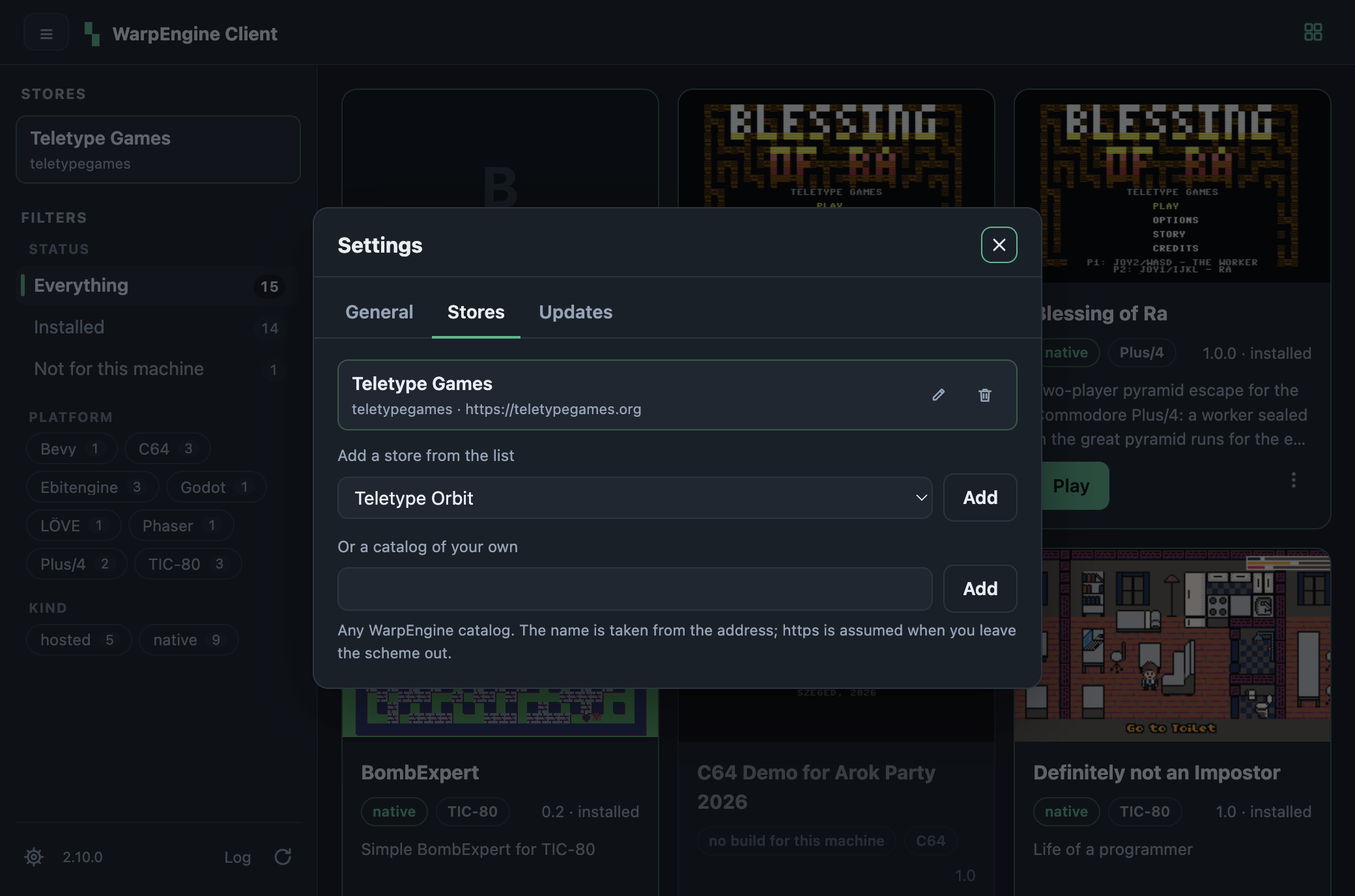
The gear opens a dialog with everything that is not about the catalog in front of you, on three tabs:
- General — the language (follows the system, switchable: English and Hungarian) and the default view, grid or list, the same preference the bar's toggle writes.
- Stores — every store on this machine with its id and catalog address. The pencil renames a store in place: Enter saves, Escape cancels. Only the name can change, because the id, the folder and the games folder all derive from the catalog, so a different catalog is a different store. The bin removes a store. Under the list, Add a store from the list offers what the registry publishes and this machine does not have yet, and Or a catalog of your own takes any catalog address. Adding a store closes the dialog and opens the new store.
- Updates — two blocks, kept apart because they are two different things. This client shows the version and a Check for updates that asks the client's own release list on the forge and answers in place: This is the latest version, or Version X is available with a button that opens the release page in the browser. The app does not update itself and does not ask on its own; nothing happens until you click. Titles with a newer version lists the installed titles the catalog has moved past, each with an Upgrade, and Upgrade all when there is more than one.
Removing a store uninstalls what it installed. The bin asks first, and says how many titles will go with it. A store's state.json is the only record of which payloads, icons and menu entries belong to it, so leaving the games behind would leave orphans nothing could ever identify. The catalog cache, the settings and any sign-in token go too.
Cards
A card's button is Install, Update, or Play / Open once installed. The three-dot menu on an installed card holds Upgrade (live only when the catalog has something newer), Reinstall and Uninstall. Reinstall is for the copy that looks installed and does not work: Refresh and Upgrade leave an intact install alone, Reinstall removes it first and unpacks it again from the catalog, icon and menu entry included. Each card says whether it is native — unpacked and run locally, works offline — or hosted: a browser build the catalog serves, so its entry opens a page and needs the network.
Everything in the catalog is listed, including what this machine cannot install. Those cards are dimmed, carry an unsupported platform or no build for this machine badge with the engine's explanation, and have nothing to press — a Raspberry Pi facing an x86-only build, say. A store that hides them leaves the visitor guessing whether the catalog is small or their machine is odd. They have their own status, Not for this machine, and stay out of the native/hosted counts, because a title with no build has no mode to count.
Since 2.7.0 the Commodore 64 and Plus/4 titles install too: since WarpEngine 0.11 their releases carry yapeSDL bundles with a launcher named after the game that sets the machine and autostarts the cartridge, and a program named after the game wins program discovery outright. The cards name every platform the way the catalog does — Plus/4, TIC-80, LÖVE — read from the server's build matrix (GET /api/builds), so a catalog can add a platform without a new client; an engine without the endpoint keeps the slugs.
Every card carries a band of box art of the same height — the first letter of the title when there is no image — so buttons line up across a row. This was quietly broken until the window was photographed: rows split the window height evenly instead of following their content, which collapsed the art and clipped the buttons, while every automated count passed because the nodes were all in the page.
While the store is working, only the things that would start a second call are disabled. The menu, the log drawer and the filters keep working, because they change the screen and nothing on disk.
Anything installed here is a normal menu entry, so it also shows up in your launcher, Dock or Start menu. The app does not have to be running to play.
Development
make is the front door; it wraps the npm scripts. make on its own lists everything.
| Target | What it does |
|---|---|
make setup |
install dependencies (checks the Node version first) |
make build |
compile TypeScript, bundle the preload and the renderer |
make typecheck |
type-check, emit nothing |
make lint |
the strict rule set (make lint-fix fixes what it can) |
make check |
typecheck, lint and every test suite — the gate |
make start |
run against whatever store is installed |
make icons |
render every icon format from resources/icon.svg |
make smoke |
drive the store with no window and no Electron at all |
make storetest |
add, rename and remove a store in a sandbox — the only code that deletes a tree |
make uitest |
load the window once and report what rendered (SELFTEST_SHOT=shot.png photographs it, settings tabs included) |
make test |
the three suites |
make dist |
package for this machine (dist-mac, dist-win, dist-linux) |
make publish |
upload the packages in dist/ to the Gitea release |
make release |
package and publish in one go |
make clean |
remove build/ and the packages (distclean also drops node_modules) |
make version |
the versions involved, including whether tea is there |
The npm scripts still work directly (npm start, npm run dist:mac). The Makefile adds no logic beyond the release step, and every script that runs the app builds first, so there is no way to test a stale bundle.
Continuous integration
.woodpecker.yaml lives in this repository, not in the update server's config extension: that extension serves game-platform pipelines, which build a cartridge and publish into the site's catalog, while this builds an application and publishes to a release.
| Step | Image | What it does |
|---|---|---|
check |
warp-engine-client-ci:node22 |
node_modules (see below), type-check, lint, the smoke test and the store lifecycle test |
linux |
electronuserland/builder:22 |
AppImage and deb |
windows |
electronuserland/builder:22-wine |
NSIS installer and portable exe, through Wine |
release |
ci-tools (by digest) |
on a tag only: creates the release and attaches what it built; curl, jq, zip and git are in the image, so nothing is installed |
The check image is electronuserland/builder:22 with this repo's node_modules preinstalled under /ci, next to the sha256 of the package-lock.json they came from. It is built by ci/warp-engine-client.Dockerfile in the teletypegames repo, and the nightly cron rebuilds it when master has a lock it has no lock-<sha> image for; the tag moves, so the step always pulls. scripts/ci-npm.sh copies those modules when the lock matches (a second instead of 15 s of npm ci), and runs npm ci when it does not.
macOS stays a local build — Apple's toolchain exists only on a Mac — so a release has two halves: pushing a vX.Y.Z tag builds Linux and Windows and creates the release with RELEASE_NOTES.md as its body, and make release on a Mac pushes the macOS package onto the same release. Either half can go first. The window test is local too: it needs a display and a store on the machine.
Publishing needs a gitea_token repository secret with write access. Woodpecker does hand steps a forge credential, and the script uses it when the secret is missing, but it cannot be relied on: a manual build has it, a build started by the tag webhook does not. Two publishers exist — scripts/release.sh drives the tea login on a workstation, scripts/ci-upload.sh speaks the API with whatever credential CI has.
Both build steps end by checking what they produced: a package under 10 MB did not finish. A half-finished Wine build leaves a stub named like the real installer, and ls is perfectly happy with that. The Windows step cannot be rehearsed on an Apple Silicon Mac: Wine assumes 4 KB memory pages and the host has 16 KB ones.
The Windows installer is not signed: Windows warns about an unknown publisher until there is a code-signing certificate. Linux packages carry no signature by convention.
Publishing a release
make release
make publish TAG=v1.0.2                 # a tag other than package.json's
scripts/release.sh dist/one-file.dmg    # just one package
The tag comes from package.json, so npm version patch is the only place a version is set. The release is created if missing, and an attachment whose name is already there is replaced, so a rebuild plus a second make publish lands instead of erroring. Release notes come from RELEASE_NOTES.md when present. The repository is read from origin, so a fork publishes to the fork. Package names have no spaces (WarpEngineClient-2.3.0-arm64.dmg), because a space in a release asset is a space in every curl that ever touches it.
It needs tea installed and logged in — the devarea repo has make tea. Overridable: TAG, REPO, TEA_LOGIN, NOTES, DIST.
Node 22+ is needed to install, not to run: Electron's installer is ESM-only and older Node cannot require() it. The packaged app carries its own runtime.
npm run uitest uses its own user-data directory and skips the single-instance lock. Otherwise a copy the user already has open swallows the test process, which exits 0 and reads as a pass.
The test scripts accept a sandbox store, which is how this repo is tested without touching a working installation. STORE_ROOT replaces the search path rather than prepending to it: now that a store can be removed, a sandbox that can reach a working installation is not a sandbox.
STORE_ROOT=/tmp/sandbox-root npm start
SMOKE_HOME=/tmp/sandbox-root/ttg-desktop npm run smoke
SMOKE_HOME=<dir> SMOKE_TOKEN=<bearer> npm run smoke      # as a signed-in person
How it is put together
TypeScript in layers, dependencies pointing inward. STRUCTURE.md in the repo is the map — layers, every pattern in use, naming rules — and it is the file to read before adding anything.
| Layer | What lives there |
|---|---|
src/shared/ |
the IPC channel table, the bridge contract, the DTOs, the message bundles |
src/domain/ |
models, ports and errors — no Electron, no Node |
src/application/ |
services and the domain-to-DTO mappers |
src/infrastructure/ |
adapters: the store engine, HTTP, the archive reader, the filesystem, Electron |
src/main/ |
the window, the IPC controllers, the composition root, the self-test |
src/preload/ |
the bridge, bundled into one file — a sandboxed preload cannot require modules |
src/renderer/ |
the state store, the views and the renderer controllers |
src/scripts/ |
the smoke test and the store lifecycle test: the same services with no window |
Two properties the layers buy:
- the catalog can be driven with no window and no Electron — the smoke test assembles the same services against the same ports;
- the window never receives a filesystem path. A title crosses the bridge without one, and launching is asked for by name and resolved in the main process from the store's own state.
The window is drawn from its state alone: the log, the gate, the settings dialog and the filter are fields in one store, every view has a single render(state), and wiring happens only in the three composition roots (the app, the smoke test, the lifecycle test). Data that came over the bridge or off the disk goes through a checked reader, never a cast.
The linter is strict on purpose: explicit types on every signature, no any, no non-null assertions, exhaustive switches. A translation with a missing key does not compile, and neither does a channel the preload does not implement.
The store engine is src/infrastructure/engine/, behind the StoreCatalogGateway port: the catalog client with its cache, the surveyor that says which titles this machine can install and why not the rest, the release picker, the host detector, the payload installer, the .desktop / .app / .lnk launcher writers and the state file. Above the port nothing knows any of that exists. A RetroArch store would write playlists rather than menu entries, so it would be a second gateway and a second entry in STORE_ENGINES, not a second code path.
Reading a zip without a dependency. Node has no zip reader, so ZipArchive is one over node:zlib: it walks the central directory, inflates stored and deflate entries, restores the executable bit and symlinks from each entry's attributes — the SDL2 framework inside yapeSDL's .app is a tree of them. It refuses zip64, unknown compression methods and paths that would escape the destination.
Which WarpEngine served the catalog. Every WarpEngine API response carries a WarpEngine-Version header. SUPPORTED_WARP_ENGINE_VERSIONS lists the versions this client is written against, and each maps to the CatalogDialect that reads its catalog shape. The switch is exhaustive, so adding a version stops the build until somebody says what it reads like.
| What the header says | What happens |
|---|---|
| a supported version (0.2 to 1.0 today, two dialects between them) | its dialect reads the catalog, and the log names it |
| nothing at all | read as the oldest supported version — an engine older than 0.4.0 |
| older than anything supported | the same, and the log says so |
| newer than anything supported | the newest dialect is tried anyway, with a warning that titles may be missed |
contextIsolation on, nodeIntegration off, sandbox on, and a CSP that allows only the app's own script and stylesheet plus images over HTTPS. Links open in the real browser; the window never navigates.
Verified, and not
Every version is measured with make check — no type errors, no lint findings, three green suites — and the window photographs itself with SELFTEST_SHOT, which is how the collapsed grid rows (1.x) and the blank window of 2.6.0 were found: an inline <svg> is not an HTMLElement, so the element check threw in the first constructor and nothing after it ran. The headless smoke test could not see that; the window check fails on it in the first second.
- The store lifecycle — adding, renaming and removing a store — runs in a temporary root on every
make check, and the rename is read back from the file. - The self-test counts the cards, the filter rows and the card menus, opens the settings, counts its store rows against the side menu's, and closes it.
- The registry path was exercised against a local endpoint serving the site's payload; the slug came out
teletypegamesfrom the catalog host, and installing the same record twice landed in the same home. - The signing was measured, not assumed: quarantine flag set on a copy unzipped from the release artifact,
codesign --verify --deep --strictclean,syspolicy_checkreporting only the expected "adhoc signed" warning.
Not tried on Linux or Windows. The paths and the launch behaviour are written for them, and the CI builds the packages, but .desktop and .lnk launchers have been generated and read, not clicked. Notarisation, a Windows signing certificate and an in-app update are all open — see the releases for what each version changed.