BMAGIC
Boot Magic (
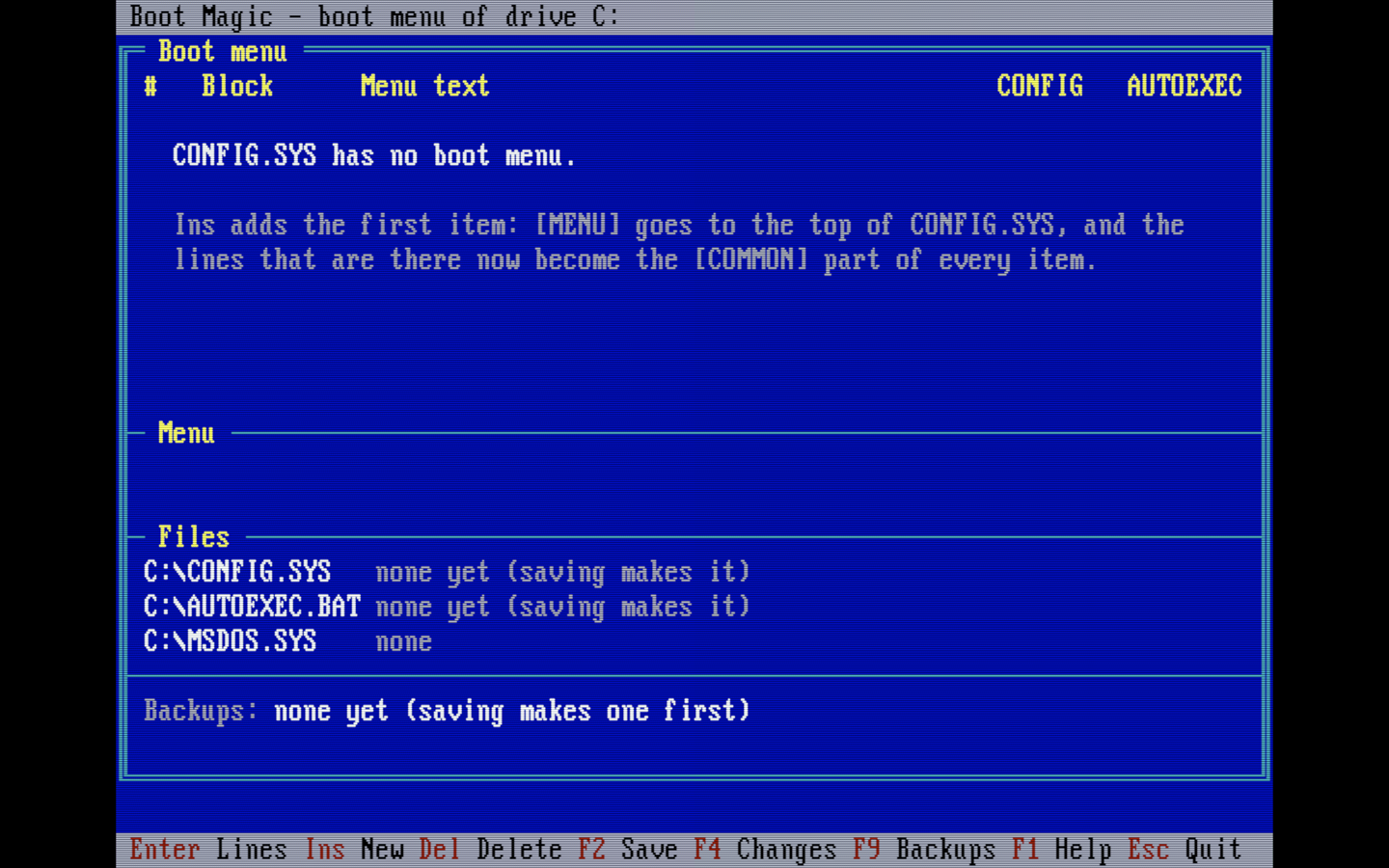
BMAGIC.EXE) is a DOS program (C++, Open Watcom, 16-bit, about 64 KB) that edits the boot menu of MS-DOS 6 and later. It readsCONFIG.SYS,AUTOEXEC.BATandMSDOS.SYSin the root folder of the boot drive, maps the menu in them, and lets you add, edit, copy, rename, move and delete menu items, edit their lines, and set the default item, the timeout, the colors and NumLock. It also sets the startup options of a Windows 95/98MSDOS.SYS.It changes only the lines it has to change. Before every save it shows the changes in a diff and backs up the files; any backup can be compared with the files on the disk or restored. It is built in layers on DOSLIB, like GMENU and DOSINST.
- Repository: git.teletypegames.org/dos/bmagic
- Download v0.1.0: BMAGIC-v0.1.0.zip · the executable alone: BMAGIC.EXE
- Releases: git.teletypegames.org/dos/bmagic/releases
Installation
- With DOSINST:
DOSINST INSTALL BMAGICinstalls the latest release from the DOSINST store toC:\APPS\BMAGIC, and running it again updates it. An update keeps the backups (DOSINST keeps files it did not install);DOSINST REMOVE BMAGICdeletes the folder, the backups too. - By hand: copy
BMAGIC.EXEto any folder, for exampleC:\APPS\BMAGIC\.
BMAGIC        the boot files of the boot drive
BMAGIC D:     the boot files of another drive (for example a disk you prepare)
The boot drive comes from DOS (4.0 and later); if DOS cannot tell, Boot Magic uses C:. In DOSBox give the drive (BMAGIC C:), because DOSBox does not boot from these files. The exit code is 0 when files were written, 1 when nothing was written, and 2 on an error. Restart the computer after saving: DOS reads these files only at boot.
The boot menu
CONFIG.SYS                          AUTOEXEC.BAT
  [MENU]                              @ECHO OFF
  MENUITEM=NORMAL,Normal start        PATH C:\DOS        <- every configuration
  MENUITEM=GAMES,Games (EMS)          GOTO %CONFIG%
  MENUDEFAULT=NORMAL,10               :NORMAL
  MENUCOLOR=15,1                      LH SMARTDRV
  NUMLOCK=OFF                         GOTO END
                                      :GAMES
  [COMMON]                            LH MOUSE
  DOS=HIGH,UMB      <- every item     GOTO END
                                      :END
  [NORMAL]
  DEVICE=C:\DOS\HIMEM.SYS
  [GAMES]
  DEVICE=C:\DOS\HIMEM.SYS
  DEVICE=C:\DOS\EMM386.EXE RAM
An item is a MENUITEM line of [MENU], a [NAME] block in CONFIG.SYS, and a section of AUTOEXEC.BAT from the :NAME label to the next label. DOS sets CONFIG to the name of the chosen item, and GOTO %CONFIG% jumps to its label. The sections end with a GOTO to a common end label (:END unless the file uses another one).
| Action | Key | What changes |
|---|---|---|
| New item | Ins | A MENUITEM line after the last one, a [NAME] block after the last item block, a section before the end label ending with GOTO END. It can be a copy of another item. The first item of a CONFIG.SYS without a menu creates [MENU], and the lines already there go under [COMMON]. |
| Rename | F3 | The MENUITEM line, the [NAME] line, MENUDEFAULT, the INCLUDE=NAME lines and the :NAME label. |
| Delete | Del, then Y | The MENUITEM line, the block, the section, MENUDEFAULT and the INCLUDE lines. Deleting the last item also removes [MENU] and GOTO %CONFIG%. |
| Move | Ctrl+PgUp / Ctrl+PgDn | Swaps two MENUITEM lines, the order of the menu. |
| Menu | F6, F5 | MENUDEFAULT (item and 0-90 s timeout), MENUCOLOR, NUMLOCK; F5 makes the selected item the default. |
| Lines | Enter, F8 | The block and section of an item, or a whole file (Tab moves to the next one). Lines are edited up to 200 characters. |
| MSDOS.SYS | F7 | BootMenu, BootMenuDefault, BootMenuDelay, BootGUI, Logo, BootKeys in the [Options] block of a Windows 95/98 MSDOS.SYS; its attributes are kept. The binary MS-DOS 6 MSDOS.SYS is not touched. |
A name is 1-8 letters, digits, _ or -, not MENU or COMMON. Batch labels count only 8 characters, so the first 8 must differ from the other items'. An item whose block or label is missing shows none or no label in red: a missing label stops GOTO %CONFIG%. F1 shows all the keys.
Saving and backups
Nothing is written until you save. F4 shows the changes so far, and F2 first shows the same review: removed lines in red, added lines in green, with 3 unchanged lines around them. F2 in the review saves:
- A new backup set goes to
BACKUP\NNN\next toBMAGIC.EXE: a byte-for-byte copy of each boot file and aSET.INIwith the date, time, drive and a note. If the backup cannot be made, nothing is saved. - Each changed file is written as
X.$$$; the old file is renamed toX.BM$, the new one takes its name, thenX.BM$is deleted. If a step fails, the old file is put back. Line ends and the EOF byte stay as they were. - Files that had the read-only, hidden or system attribute get it back.
F9 lists the backups. Enter compares one with the files on the disk in the same diff view, Ins makes a backup now, Del deletes one, and R restores one — after first backing up the files it replaces.
Building and tests
The build needs Open Watcom v2 (in ~/.local/opt/watcom, or WATCOM=<folder>), the same toolchain as the other DOS programs:
SOURCE/build.sh                      # ../BMAGIC.EXE
SOURCE/build.sh test                 # the test version (keys from TESTKEYS.TXT)
SOURCE/test/unit/run.sh              # unit tests on the host, layer check first
python3 SOURCE/test/run.py           # screen tests in DOSBox, on sample boot drives
The layers follow the DOSLIB rules: model (the menu map, the editor, the diff, no I/O), repository (the boot files and the backup sets), service, controller, view, platform (the boot drive, attributes, the clock) and app; DOSLIB is a git subtree in SOURCE/lib.
Woodpecker runs the style check, the layer check and the unit tests, then the build and the DOSBox tests on every push. A raised version in metadata.json (with Version in SOURCE/app/version.h raised to match), pushed to master, gets its vX.Y.Z tag from the pipeline, and that tag publishes a Gitea release and publishes the release to the catalog, which puts BMAGIC into the DOSINST store. Every step is a command of the dos-tools builder image (git.teletypegames.org/build/dos-builder), which has the toolchain preinstalled; the repo holds only the platform: dos marker and its metadata.json, whose dos block says what a release holds. The screen tests run four cases at a time (JOBS, each in its own folder). The Gitea release is made by the WarpEngine's shared release step from the files dos-pack lists. There is no store step: the DOSINST store is the engine's DOS shelf, which it rebuilds from the catalog on every publish, so the pipeline needs no deploy key.
Limitations
- At most 9 menu items, as DOS shows them. Further
MENUITEMlines andSUBMENUlines are kept but not shown; the file editor (F8) reaches them. - Only the
GOTO %CONFIG%style ofAUTOEXEC.BATis mapped.IF "%CONFIG%"=="GAMES" ...lines are kept, but a rename does not change them. - A file of at most 16000 bytes and 500 lines.
- The diff looks at most 50 lines ahead for where the files agree again; larger moves show as removed and added lines.