DOSINST
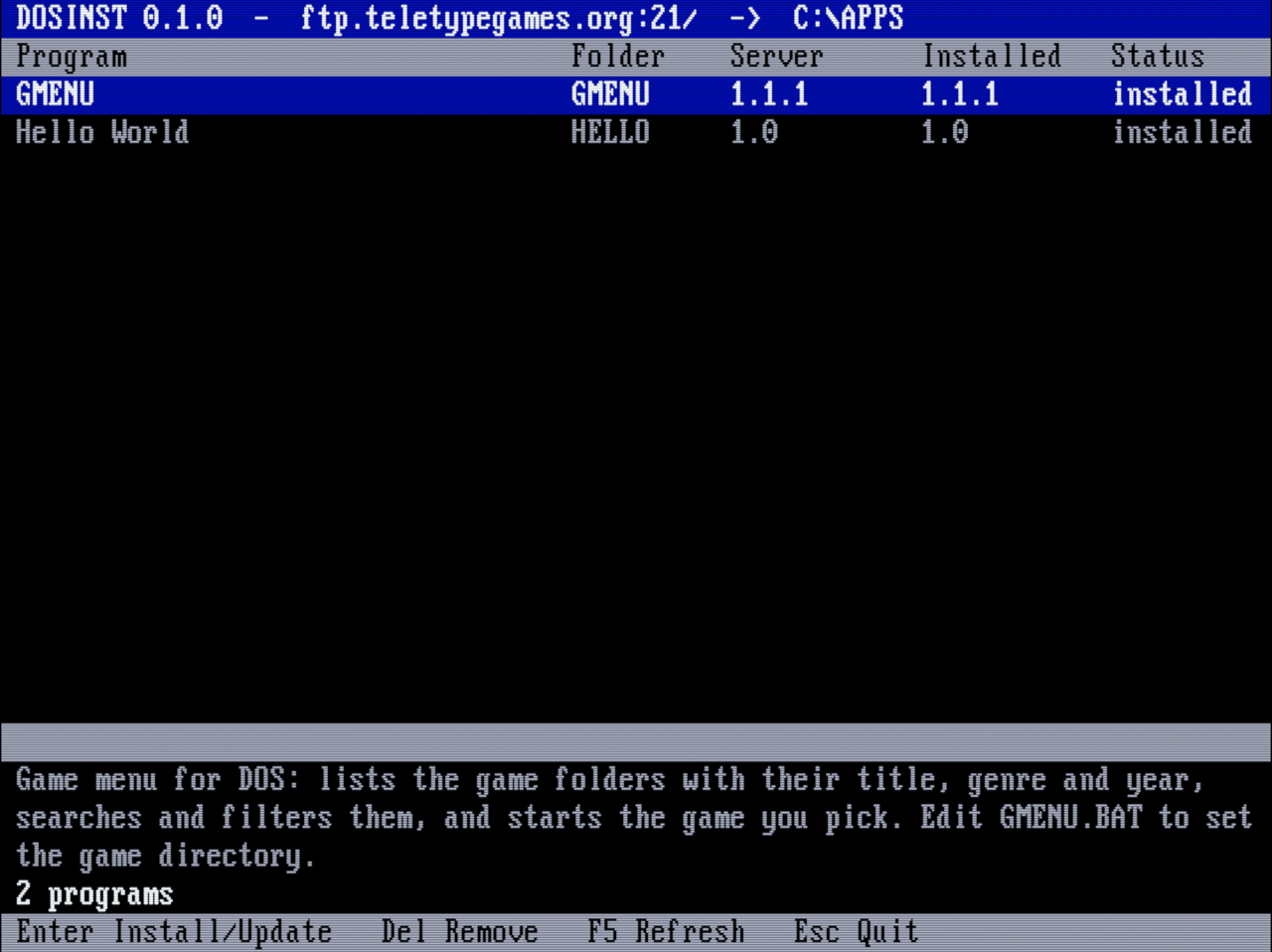
DOSINST is a DOS program (C++, Open Watcom, 8086 code) that installs, updates and removes programs from an FTP server. Every folder on the server is one program with an
INFO.INI; DOSINST lists them with the server's and the installed version, and copies the folder you pick to the local disk. Our store isftp://ftp.teletypegames.org; GMENU is published there on every release.The same source also builds
DOSINSTW.EXEfor Windows 95 and later (Winsock, in a console window), with the same screen and commands — for Windows machines, where a DOS program does not reach the network.
- Repository: git.teletypegames.org/dos/dosinst
- Store:
ftp://ftp.teletypegames.org/APPS(anonymous, read-only, on the FTP server) - Download v0.6.0: DOS: DOSINST-v0.6.0.zip · Windows 95 and later: DOSINSTW-v0.6.0.zip · the executables alone: DOSINST.EXE, DOSINSTW.EXE
- Releases: git.teletypegames.org/dos/dosinst/releases — once installed, DOSINST updates itself from the store
What it does
- Lists the program folders of the server with name, version, the installed version and a status:
new,installed,UPDATE(the versions differ) orlocal only(installed, but no longer on the server). - Installs a program (Enter): downloads its folder with the subfolders to a temporary folder, checks every file (CRC32 and size), and only then moves them to
C:\APPS\FOLDER,INFO.INIlast. A broken or interrupted download leaves the installed program as it was. - Updates it (Enter again): replaces its files and deletes the ones the new version no longer has (
INSTALL.LSTlists what DOSINST installed). Files that exist only locally — saves, settings, GMENU's favorites — stay. - Updates itself: DOSINST is in the store too (
DOSINSTfor DOS,DOSINSTWfor Windows). Its update goes into the folder of its own executable, andDOSINST.CFGis kept. - Removes it (Del, asks first): deletes
C:\APPS\FOLDER. - Also from the command line, for batch files:
DOSINST                  menu
DOSINST LIST             list the programs
DOSINST INSTALL GMENU    install or update a program
DOSINST REMOVE GMENU     remove an installed program
The store
/
  GMENU/
    INFO.INI
    FILES.LST           <- CRC32 and size of every file
    GMENUPRG.COM
    ...
  HELLO/
    INFO.INI
    HELLO.BAT
    DATA/README.TXT     <- subfolders are copied too
[program]
name=Hello World
description=The description, in one line.
version=1.0
platform=DOS
- Folders without an
INFO.INIare skipped. platformis optional,DOSorWIN32. The DOS build does not listWIN32programs; DOSINSTW lists both, since Windows runs DOS programs too. DOSINST's own store folders areDOSINST(DOS) andDOSINSTW(Win32): each build updates itself from its own and does not list the other.- File and folder names must be DOS 8.3 names; DOSINST stops with an error on any other name.
- The installed version is read from the copied
INFO.INI, so there is no separate database on the DOS machine. FILES.LST(crc32 size pathper line) is optional;server/mkfiles.sh FOLDERwrites it. Without it DOSINST checks only the size, which it asks the server for.
Publishing: since WarpEngine 1.7 the store is the DOS shelf of the WarpEngine of teletypegames.org (layout: "folders"), and the engine rebuilds it from the catalog on every publish. The Woodpecker pipelines of DOSINST, GMENU, BMAGIC and TTGWIKI only publish their release to the catalog on a vX.Y.Z tag, which the pipeline makes itself when version in metadata.json is raised (WarpEngine 1.9); the engine unpacks each folder from the release zip without its settings files and writes its INFO.INI and FILES.LST. A program hidden or deleted in the catalog leaves the store. Only folders the shelf's INDEX.TXT listed are ever removed, so a folder can still be published by hand (a test program, say): copy it to /srv/stacks/teletype-games/data/softwares/shelves/APPS/ on the server and run server/mkfiles.sh on it; no restart is needed.
Setup
DOSINST needs a packet driver and mTCP (its DHCP.EXE fills in the network settings). The settings are in DOSINST.CFG next to DOSINST.EXE:
SERVER=ftp.teletypegames.org
PORT=21
PATH=/APPS
DEST=C:\APPS
DOSBox Staging — the NE2000 emulation plus the Crynwr NE2000.COM packet driver (mTCP and the driver in C:\MTCP):
[ethernet]
ne2000 = on

[autoexec]
C:\MTCP\NE2000.COM 0x60 3 0x300 > NUL
SET MTCPCFG=C:\MTCP\MTCP.CFG
C:\MTCP\DHCP.EXE
PATH Z:\;C:\WINDOWS;C:\APPS\GMENU;C:\DOSINST
In DOSBox every PATH line replaces the previous one, so all folders go into a single line, starting with Z:\ (DOSBox's own commands, like MOUNT). For a silent start, set startup_verbosity = quiet in [dosbox], put @echo off first in [autoexec] and send the output of the programs to NUL (C:\MTCP\DHCP.EXE > NUL).
A real machine needs the packet driver of its own network card instead of NE2000.COM. DOSINST.EXE does not work in a DOS window of Windows 95/98, because Windows owns the network card there: use DOSINSTW.EXE there, which needs nothing but Windows' own TCP/IP. Windows does not let a running program be overwritten, so DOSINSTW's own update is finished right after it exits.
The server
The store is the APPS folder of the Teletype Games FTP server (infra/ftp-server): anonymous and read-only, passive mode only, ports 21 and 30000–30019. DOSINST connects to the data port on the server's own address, so it also works behind NAT. The root has APPS, C64, PLUS4, WARP and WIKI: a DOSINST older than 0.6.0 has PATH=/ in its DOSINST.CFG (an update never changes it) and finds no program there, so set PATH=/APPS in it by hand.
Building and tests
The build needs Open Watcom v2 (the snapshot release has macOS and Linux binaries):
SOURCE/build.sh
The source is in layers, each using only the ones below it through their interfaces (the rules are on the DOSLIB page): model (programs, FILES.LST, INSTALL.LST, the configuration), repository (the store over FTP, the installed programs, the staging folder of an install), service (the program list, install, remove), controller and view (menu and command line), app (puts them together); the DOS and the Windows build only differ in main_dos.cpp / main_win32.cpp and platform/. SOURCE/lib is DOSLIB.
The unit tests run on the host without DOSBox, on a fake store and an in-memory disk (a bad checksum, an update that deletes the stale files, a self update, the menu with scripted keys); they check the layers first:
SOURCE/test/unit/run.sh
SOURCE/test/run.sh starts the FTP server on the host and runs DOSINST in a headless DOSBox Staging: it lists, installs, updates and removes programs from the command line and from the menu, and compares the copied files byte by byte. The menu is driven by a test build that reads its keys from TESTKEYS and saves the screen.
License
DOSINST uses the mTCP TCP/IP library by Michael B. Brutman, which is GPLv3, so DOSINST is GPLv3 too.